Detecting network discovery and intrusion with snort
_OVERVIEW
In this guide i will be writing a detection rule for ICMP pings.
let’s start with a visualization of how the rules should be written in snort:
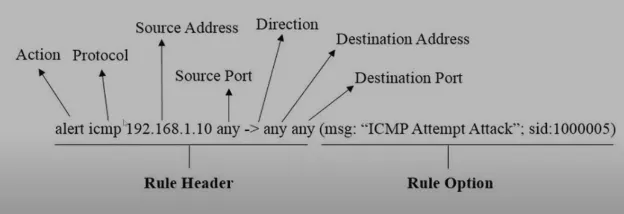
creating rules:
sudo gedit /etc/snort/rules/local.rules

Explanation:
Alert is the action associated with the event.
ICMP is the protocol we want to listen for events on.
any -> $HOME_NETany:source address where the ping message is coming from $HOME_NET:destination(the subnet range of my network),
msg: information about the triggered alert.
Become a member
sid: is a unique identifier for the event, you can choose any number.
Testing ping Detection
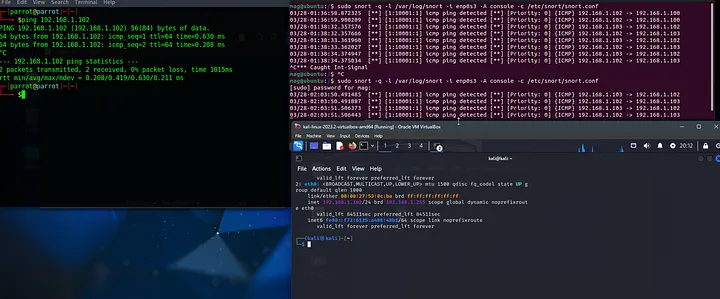
for testing, i have a network of 3 VMS on bridged network mode, my snort VM will serve as the IDS host that monitors the network traffic for ICMP pings, and the second and third machines will be used as the test subjects.
All virtual machines are typically connected to the same network switch as separate entities. When one virtual machine sends a packet to another, the switch forwards that packet to the appropriate destination based on MAC addresses. However, the packet still traverses the network segment where the Snort VM is connected, allowing it to capture and analyze the traffic.
starting SNORT.
sudo snort -q -l /var/log/snort -i enp0s3 -A console -c /etc/snort/snort.conf
-q: used to enable quiet mode. This means that Snort will not display its version information or the decoded contents of packets as they are processed.-l: used to specify the directory where Snort will write its log files.-i: used to specify the network interface on which Snort should listen for network traffic.-A: just displays the alert in terminal.
-c: location of the snort configuration that will be used on run time.